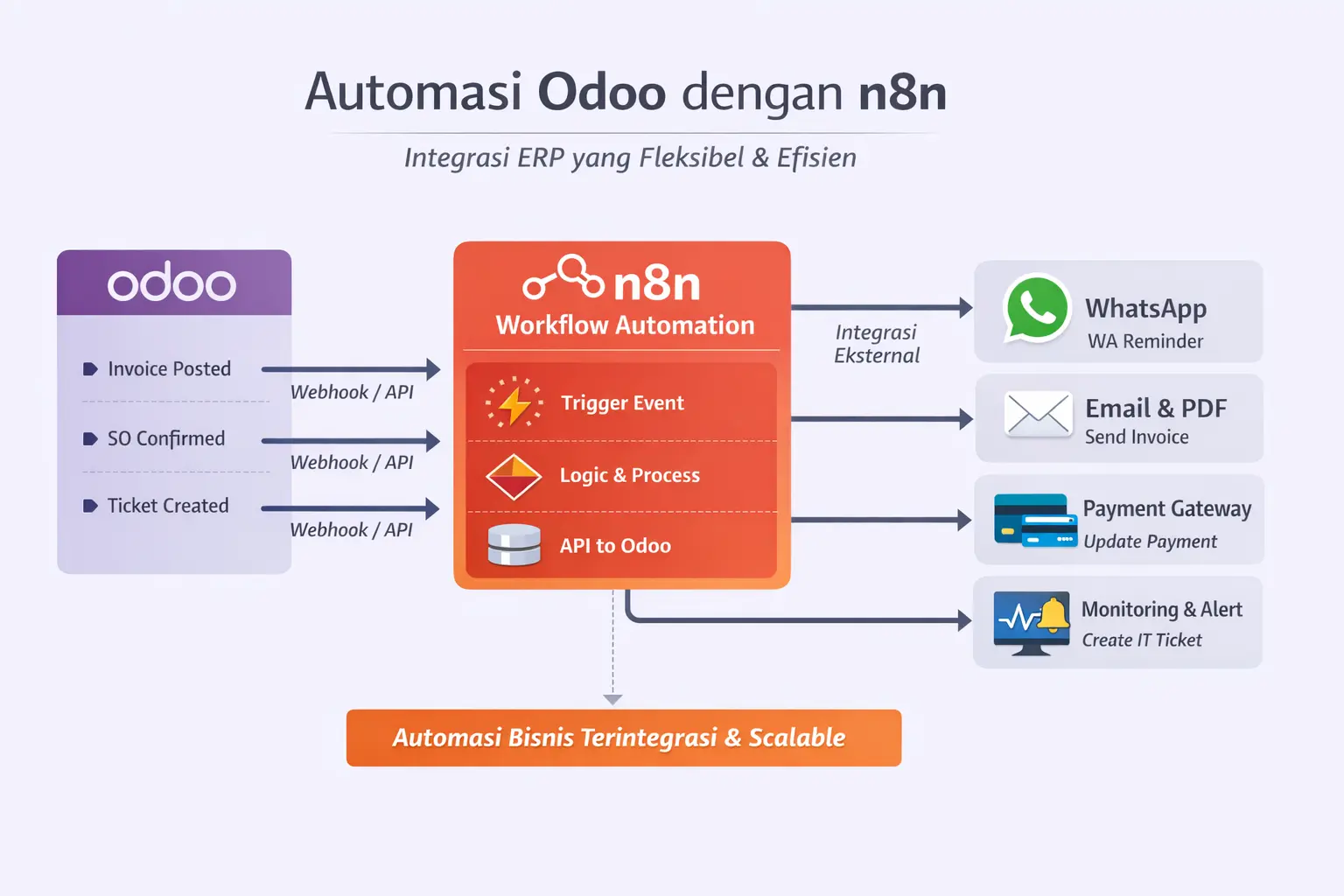
In the era of digital transformation, companies not only needa stable ERP, but alsoautomated, flexible, and easily integrated workflowswith various external systems.
One increasingly popular approach isto combine Odoo with n8nas a workflow automation engine.
Workflow Challenges in Traditional ERP
Many companies use Odoo as their core ERP, but face challenges such as:
Workflows are too rigid
Custom modules are expensive and hard to maintain
Integration with WhatsApp, Email, Payment Gateway, or Monitoring is not flexible
Difficult to create cross-system automation
This is wheren8n plays a role as a workflow automation layeron top of Odoo.
What is n8n and Why is it Suitable for Odoo?
n8nis a platformfor open-source workflow automationthat allows integration between systems with alow-code.
Advantage of n8n for Odoo:
Integration viaWebhook & REST API
Easily developed without changing the core of Odoo
Supports multiple services (WhatsApp, Email, Slack, Payment, Cloud)
Can be self-hosted (on-premise / cloud)
Odoo focuses onbusiness process, n8n focuses onautomation & orchestration
Automation Workflow Patterns
1. Odoo Triggers n8n Workflow
Odoo sends events to n8n via webhook.
Example events:
Invoice posted
Sales Order confirmed
Ticket status changed
New lead entered CRM
n8n then:
Checks conditions
Runs subsequent processes
Sends notifications or updates other systems
2. n8n Updates Data to Odoo
n8n can also:
Create data in Odoo
Update invoice status
Close tickets
Add activities or logs
All done viaOdoo REST APIsecurely.
3. Scheduled Workflow (Cron Automation)
Workflows run automatically based on time.
Example:
Invoice due reminders
Automatic sales follow-ups
Escalation tickets > 48 hours
Generate reports and send emails
Example Automation Use Case
A. Automatic Invoice Reminder
n8n daily cron job
Fetch overdue invoices from Odoo
Loop per customer
Send WhatsApp & Email reminders
➡Without custom module reminder in Odoo.
B. Integrated WhatsApp Helpdesk
Incoming WhatsApp
n8n parsing messages
Create ticket in Odoo
Auto reply ticket number & status
Example :https://integra.isi.id/our-product/integracampaign
C. Payment Gateway Automation
Payment gateway sends webhook to n8n
Payment validation
Update Odoo invoice
Send PDF invoice to customer
Usage Example :https://integra.isi.id/our-product/shopup
D. Monitoring & Alerts to Odoo
Prometheus / Kubecost Alerts
Enter n8n
Create IT ticket in Odoo
Send notification to WhatsApp Admin
Security & Best Practices
To be safe and scalable, consider:
UseAPI Key for integration
Do not expose sensitive Odoo endpoints to the public
Use HTTPS and IP whitelisting
Logging & retry mechanism in n8n
Separate critical and non-critical workflows
When to Use n8n vs Odoo Custom Module?
This is an interesting question, because Odoo itself already supports custom modules & Scheduler Actions, here are some reasons when to use n8n or vice versa
Use n8n if:
Cross-system integration
Dynamic workflows
Fast & flexible automation
Use Odoo Custom Module if:
Core accounting logic
Critical business validation
Very high performance