Your ERP Data Is A Business Asset
Inside the ERP is stored almost all the contents of the company's "kitchen": customer data, selling prices, stock, financial reports, to employee salaries. If this system is breached or paralyzed, the impact is felt immediately: transactions stop, data leaks to competitors, and customer trust declines.
Once the ERP can be accessed from the internet (so the team can work from anywhere), the system is also visible to bots and hackers who search for vulnerabilities every day. Therefore, a secure ERP is not just about strong passwords, but also about a guard at the door
What Is WAF? Imagine a Security Guard at the Building Entrance
WAF (Web Application Firewall) works like a security guard at the office entrance. Every guest (request from the internet) is checked first: regular guests are allowed in, suspicious guests are turned away before they can reach the room. The room is your ERP Odoo.
BunkerWeb is one of the open source (free) WAFs that can be installed in front of Odoo. Here are the threats it guards against:
Threats | Impact on business | How BunkerWeb prevents |
|---|---|---|
Repeated password guessing (brute force) | Admin account taken over, data stolen or deleted | Limiting the number of login attempts per second |
Access to the database management page | Database can be backed up, deleted, or replaced by outsiders | Closing that page from the internet |
Bots and security vulnerability scanners | Server busy serving bots, vulnerabilities found faster | Blocking suspicious behaving IPs |
SQL injection and XSS through forms | Data leaks or website appearance compromised | Checking request content with OWASP rules |
Flood of requests (light DDoS) | ERP slow or unusable by employees | Limiting requests per visitor |
How WAF Works in Front of Odoo
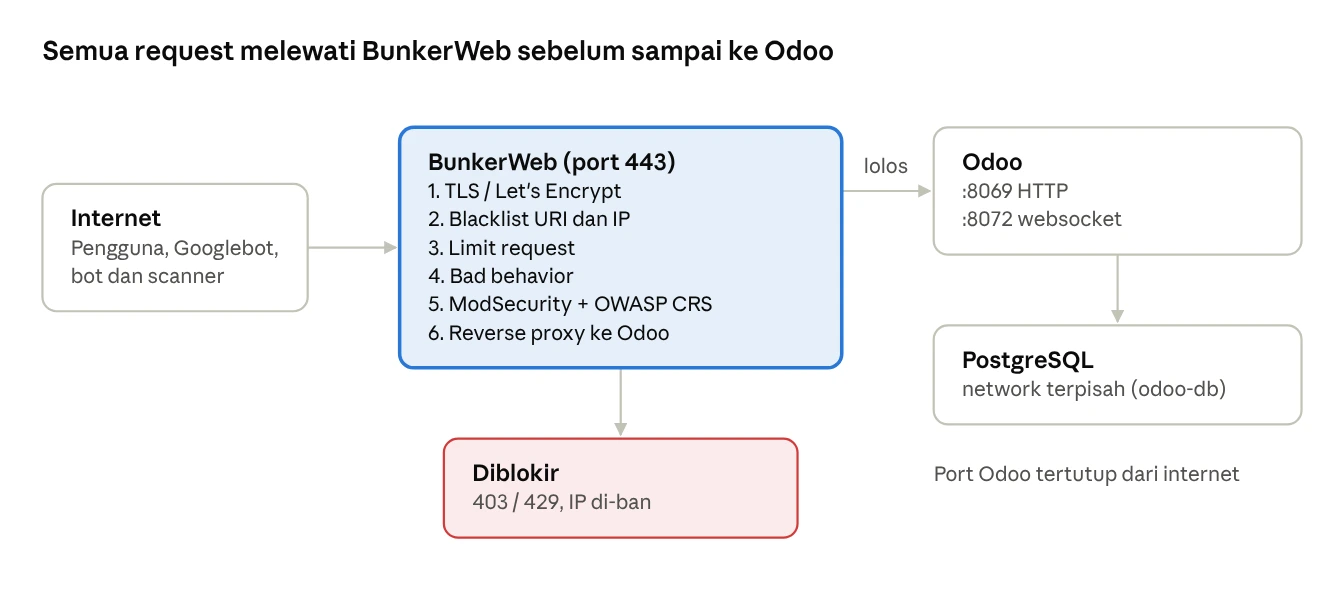
All access from the internet goes through BunkerWeb. Odoo and the database are behind it and cannot be accessed directly.
Checklist for Business Owners
You do not need to install WAF yourself. Just ensure that the vendor or IT team can answer "yes" to the following questions:
- Is our ERP protected by WAF, not just a regular reverse proxy?
- Is the Odoo database management page closed from the internet?
- Are repeated login attempts automatically blocked?
- Does the admin account use a strong password and two-factor authentication (2FA)?
- Is the database automatically backed up every day and has its recovery been tested?
- Is Odoo and its modules regularly updated?
- Is there someone monitoring attack logs periodically?
If someone answered "no", that is a priority that needs to be discussed with your IT team or ERP vendor.
Section 2: For IT Team and IT Manager
The following section explains the installation of BunkerWeb in front of Odoo using Docker.
Step 1: Docker Compose
Components used:
Service | Image | Function |
|---|---|---|
bunkerweb | bunkerity/bunkerweb-all-in-one:1.6.17 | WAF, scheduler, and Web UI in one container |
bw-db | postgres:16 | Storing BunkerWeb configuration |
odoo | odoo:19 | ERP Application |
db | postgres:16 | Odoo Database (separate from bw-db) |
This compose is intentionally minimal: only database connection. All site settings are done through the Web UI (Step 3), allowing the IT team to manage it without restarting the container.
services:
  bunkerweb:
    image: bunkerity/bunkerweb-all-in-one:1.6.17
    container_name: bunkerweb-aio
    depends_on: [bw-db]
    ports:
      - "80:8080/tcp"
      - "443:8443/tcp"
      - "443:8443/udp"
    environment:
      DATABASE_URI: "postgresql://bunkerweb:change-password-bw@bw-db:5432/db"
    volumes:
      - bw-storage:/data
    networks: [bw-services, bw-db]
    restart: unless-stopped

  bw-db:
    image: postgres:16
    environment:
      POSTGRES_USER: bunkerweb
      POSTGRES_PASSWORD: change-password-bw
      POSTGRES_DB: db
    volumes:
      - bw-db-data:/var/lib/postgresql/data
    networks: [bw-db]
    restart: unless-stopped

  odoo:
    image: odoo:19
    depends_on: [db]
    volumes:
      - odoo-data:/var/lib/odoo
      - ./config:/etc/odoo
      - ./addons:/mnt/extra-addons
    networks: [bw-services, odoo-db]
    restart: unless-stopped

  db:
    image: postgres:16
    environment:
      POSTGRES_USER: odoo
      POSTGRES_PASSWORD: change-strong-password
      POSTGRES_DB: postgres
    volumes:
      - odoo-db-data:/var/lib/postgresql/data
    networks: [odoo-db]
    restart: unless-stopped

volumes:
  bw-storage:
  bw-db-data:
  odoo-data:
  odoo-db-data:

networks:
  bw-services:
    name: bw-services
  bw-db:
    name: bw-db
  odoo-db:
    name: odoo-db
- Odoo does not open port to the host, so it cannot be accessed directly via IP:8069.
- The BunkerWeb database and the Odoo database are located in separate networks and are not open to the internet.
Step 2: odoo.conf
[options]
db_host = db
db_user = odoo
db_password = ganti-password-kuat
admin_passwd = master-password-yang-berbeda
proxy_mode = True
list_db = False
workers = 4
gevent_port = 8072
- proxy_mode = True: Odoo reads https and the original IP of visitors from BunkerWeb.
- list_db = False: Database Manager is hidden (a second layer besides blocking in WAF).
- workers must be more than 0 for the websocket on port 8072 to be active.
Step 3: Configure Odoo via BunkerWeb Web UI
- Point the DNS of the Odoo domain (e.g., erp.example.co.id) and the Web UI domain (e.g., waf.example.co.id) to the server's IP.
- Run docker compose up -d.
- Open https://IP-SERVER/setup. The wizard will ask for the admin account and domain for the Web UI. Fill in with waf.example.co.id.
- Log in to the Web UI, then enable 2FA in the profile menu.
- Open Services → Create, fill in the domain erp.example.co.id, then set the settings according to the table below.
Requirements | BunkerWeb Settings | Recommended values |
|---|---|---|
Forward to Odoo | REVERSE_PROXY_URL / REVERSE_PROXY_HOST | / → http://odoo:8069 |
Websocket (Discuss, notifications) | REVERSE_PROXY_URL_1 / REVERSE_PROXY_HOST_1 / REVERSE_PROXY_WS_1 | /websocket → http://odoo:8072, WS = yes |
Large reports and imports | REVERSE_PROXY_READ_TIMEOUT / REVERSE_PROXY_SEND_TIMEOUT | 720s |
Upload attachments | MAX_CLIENT_SIZE | 100m |
SSL | AUTO_LETS_ENCRYPT | yes |
Login protection | LIMIT_REQ_URL_1 / LIMIT_REQ_RATE_1 | /web/login → 1r/s |
Close Database Manager | BLACKLIST_URI | ^/web/database |
OWASP Rules | USE_MODSECURITY / USE_MODSECURITY_CRS | yes |
Block scanner | USE_BAD_BEHAVIOR | yes |
The office IP is never blocked | WHITELIST_IP | Office public IP |
The setting name in this table is the same as the BunkerWeb environment variable. Teams that prefer configuration as code can write it directly in docker-compose.yml (with MULTISITE: "yes" and domain prefix, for example erp.example.co.id_REVERSE_PROXY_HOST). Choose one method for each domain, do not mix, as the values in compose can override changes from the Web UI when the container is recreated.
Step 4: Test and Monitor
# Odoo can be accessed via HTTPS (result: 200)
curl -sI https://erp.example.co.id/web/login | head -n1

# Database Manager is blocked (result: 403)
curl -sI https://erp.example.co.id/web/database/manager | head -n1

# SQL injection pattern is blocked (result: 403)
curl -sI "https://erp.example.co.id/?id=1%27%20OR%20%271%27=%271" | head -n1

# Odoo port is not open (result: timeout / refused)
curl -m 5 -sI http://IP-SERVER:8069/web/login
Then test as a regular user: login, save record, send message in chatter, upload attachment, and ensure Discuss notifications appear in real-time. Blocked requests can be viewed in the Web UI under the menu Reports.
Tips to Prevent Users from Being Blocked
Error 403 when saving data or editing the website. Fill in the email and the website page contains HTML, so OWASP rules sometimes mistakenly identify it as an XSS attack. Look for the triggered rule ID in Reports, then create an exception only for that rule and path (menu Configs, type modsec). Example:
SecRule REQUEST_URI "@rx ^/(web/dataset|mail|web_editor|html_editor)/" \ "id:10001,phase:1,pass,nolog,ctl:ruleRemoveByTag=attack-xss"- Error 429 Too Many Requests. Odoo Backend loads many files at once. Do not set strict limits for the entire site; just limit /web/login.
- Antibot and country block. Do not enable for the entire site if Odoo also runs a public website, so Googlebot can still crawl and SEO is not affected.
- API Integration (marketplace, payment gateway, mobile applications). Enter the integration server IP into WHITELIST_IP.
- Backup. In addition to the Odoo database, also back up the bw-db database, as all BunkerWeb configurations are stored there.
Frequently Asked Questions
Yes, BunkerWeb is open source and free to use. A paid version with additional features and support is also available.
WAF checks add a very small amount of time per request and are usually not noticeable to users.
No. WAF is one layer. Strong passwords and 2FA, routine updates, scheduled backups, and a server firewall that only opens ports 80, 443, and SSH are still needed.
Yes. BunkerWeb operates at the web level, so it does not depend on the edition or version of Odoo.
NPM does not have a built-in WAF. BunkerWeb can replace NPM for the Odoo domain, with a Web UI that is just as easy.
Conclusion
A secure ERP needs a guard at the door. BunkerWeb provides that protection for free: closing sensitive pages, stopping password guessing, and blocking common web attacks. For business owners, just ensure the checklist above is met. For IT teams, installation can be completed in one Docker Compose file and a few clicks in the Web UI.
Want a secure Odoo ERP without the hassle of managing servers? Integra by Infinys provides Odoo implementation, hosting cloud ERP in Indonesian data centers, as well as managed services including WAF, backup, and monitoring. For more details on this, you can email us at sales@isi.co.id